
BrandPatrol scans paid search for affiliates and hijackers running ads on your own branded keywords, follows the tracking link back to whoever placed it, and turns the whole thing into evidence your team can act on.
Figures below are from one brand we monitor, shown with its identity removed. Built on public search results and the public ad-transparency record.
Trusted by teams at






See exactly what happens: the ad that takes your click, the redirect chain behind it, the affiliate ID, the roster check and the case your team receives.
Brand protection tools ask you to trust a dashboard. We'd rather show you exactly what's being checked and how.
No access to your ad accounts, affiliate platform, or CRM. Ever.
Every method is documented on our how it works page, not hidden behind the product.
Built by a team that's worked both sides of affiliate programs. See our story.
Every case is held to the evidence standard a network's compliance team already requires.
A person reviews every case before it reaches your inbox. Nothing is published straight from a script.
Pause or cancel whenever your program changes.
A person who already typed your brand name into Google was already going to buy from you. An affiliate who buys an ad on that exact search intercepts the click first, then collects a commission on a sale you would have made anyway.
Someone typing your brand name into the search bar has already decided to buy from you. That is what a branded search means. An ad that intercepts that exact click, whether it's an affiliate in your own program or an unrelated hijacker, collects a commission on a sale you were going to make with or without it.
Every extra advertiser on your branded keyword is another bidder in that auction. When an affiliate or a hijacker starts competing for your own name, cost-per-click on that term rises for everyone still bidding on it, including you, on top of the commission handed to whichever ad wins the click.
Most affiliate agreements already prohibit bidding on the brand's own trademarked terms. The clause is only as good as its enforcement, and enforcement means someone actually checking search results for a breach, which is exactly the part that usually isn't happening.
Not every ad on your brand name is the same problem. The difference shows up in the redirect chain.
Someone searches your brand name and two different ads sit on the results page. They look similar to a shopper. Behind the click they are two different problems.
On the left ad, the redirect chain passes through the affiliate network's tracking domain, and the affiliate ID is read straight out of the tracking parameter. That ID proves the click ran through your own program, so it is filed as a brand-bidder case.
On the right ad, no affiliate ID resolves anywhere in the chain. There is nothing to match against your program, so this is an advertiser with no relationship to you.
With no partner ID to read, the public ad-transparency record names the advertiser instead. That ad is filed as a separate hijacker case, so each kind of traffic is tracked on its own.
The patrol loop runs without anything from your team while the scan is running. Drag the scene, or pick a step, to follow one ad from the results page to an evidence file. Every stage is documented on the how it works page.
For every branded keyword and close variant, we capture each paid ad actually shown on the results page (not organic listings) across the regions and devices you've scoped, on a schedule or as a single on-demand pass.
Anything running on your own branded terms is picked out of the results page and recorded with a timestamped screenshot, so there is dated proof of what a shopper actually saw.
Anything that isn't an approved partner gets its redirect chain followed hop by hop: search-engine click tracker, then the affiliate network's own tracking domain, then the landing page.
The affiliate ID and network come straight out of the tracking parameter, not a guess based on the ad's display URL. Every ad is checked against your authorized-partner roster, so an approved partner is never mistaken for a hijacker.
Timestamped SERP and landing-page screenshots, the affiliate ID and network, the full redirect path, and the country and device it was seen on land in one case record with a status your team moves through (new, in progress, solved, muted).
Every hijacker or brand-bidder case is built the same way, so your network can't argue with the shape of the evidence.
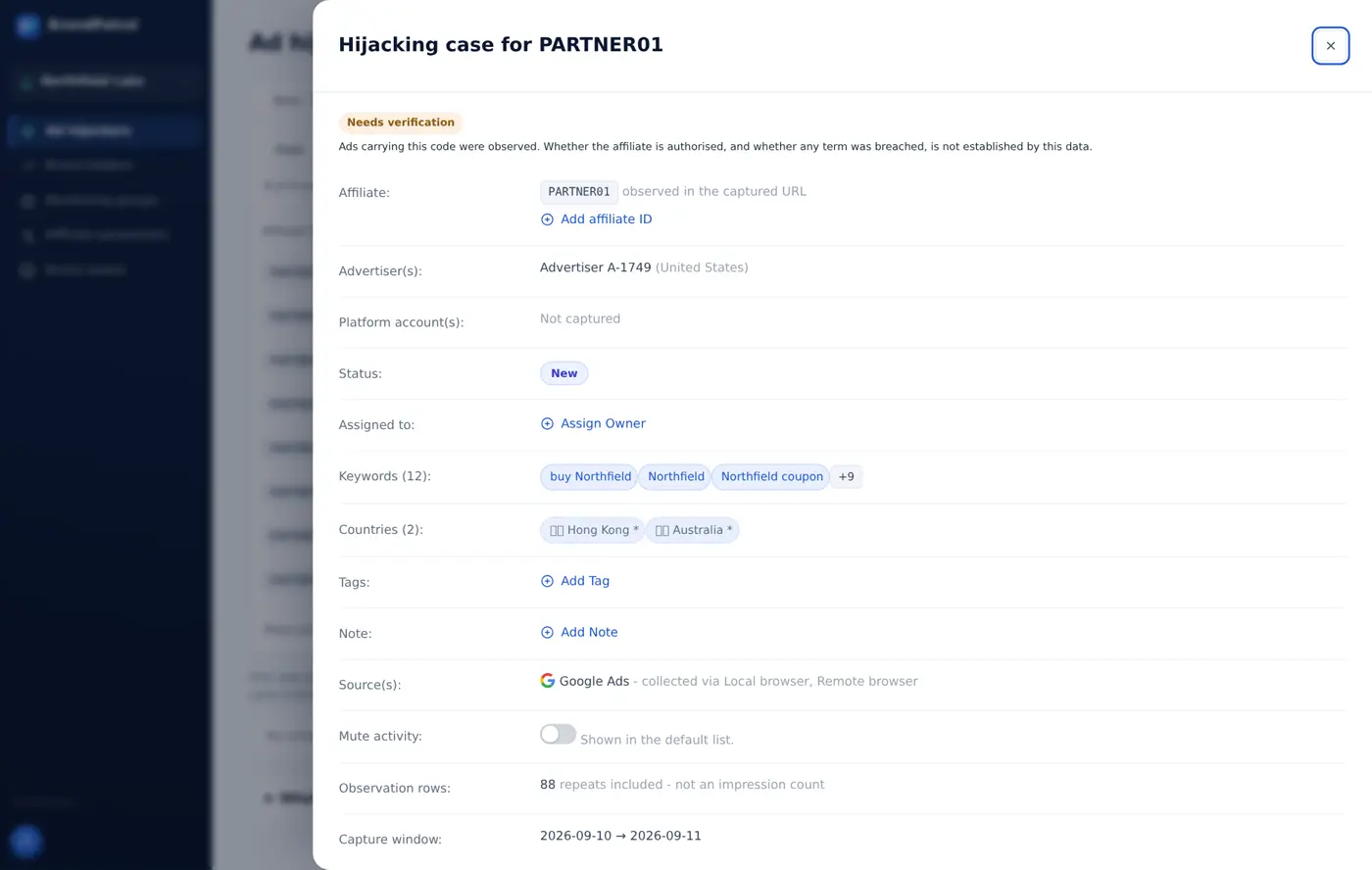
Not a mockup. A real monitored brand, with the brand name, affiliate codes and advertiser identities replaced.
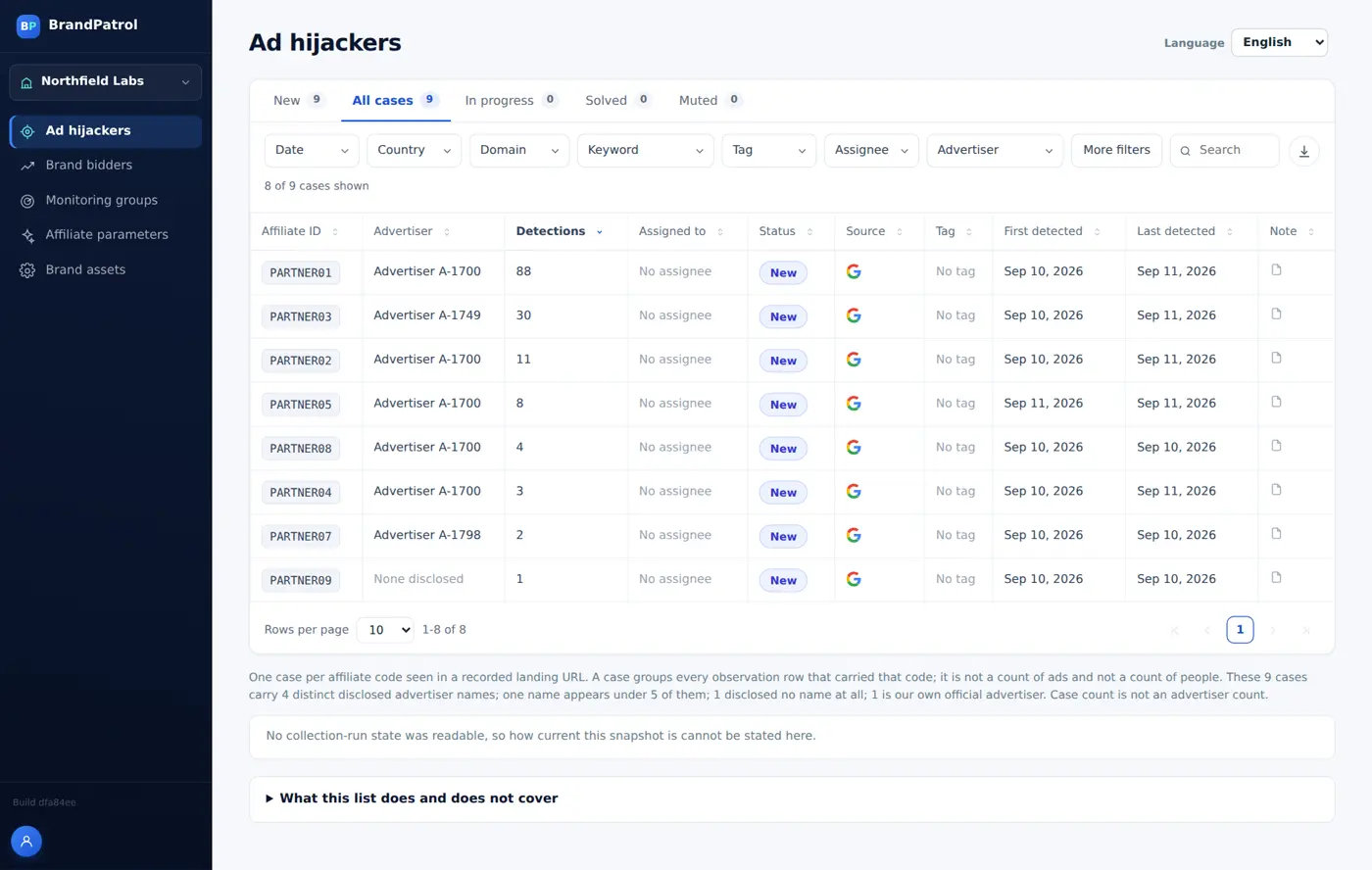
Open a case and the evidence is already assembled — including what it does not prove.
Checking your brand name by hand, or buying a broad brand-protection tool, both work up to a point. Here's where the mechanics differ.
| What matters | Checking manually / in-house | Generic brand-protection suite | BrandPatrol |
|---|---|---|---|
| Branded-keyword SERP coverage across regions & devices | Whichever regions and devices a person has time to search from | Usually a fixed region set defined at onboarding | Regions and devices you choose, checked on the schedule you set |
| Redirect chain traced to affiliate ID | No — a manual click-through rarely resolves every hop | Not usually the focus. Most watch domains and listings, not affiliate redirects | Yes — every hop, through to the affiliate ID and network |
| Roster cross-check to suppress approved partners | No — depends on someone checking a spreadsheet by hand | Not usually included. Partner rosters aren't something these tools ingest | Yes — checked against your roster before a case is ever raised |
| Evidence package a network will accept | Whatever screenshots and notes someone thought to save | Varies by vendor and report format | Timestamped SERP + landing-page shots, affiliate ID, network, redirect chain, region, and device — same fields every case |
| Ongoing vs. one-off | One-off, whenever someone has time to look | Usually a standing subscription | Either: a one-time snapshot audit or continuous monitoring |
| Setup effort | None to start, and no structured coverage either | Onboarding call plus vendor-side configuration | A domain and a keyword list; the onboarding wizard proposes a starting keyword set for you to edit |
Brand protection carries its own jargon. Here's what the terms on this page, and on our features page, actually mean.
An affiliate already inside your program buying a paid-search ad on your own brand name or a close misspelling, then collecting commission on a sale that would have reached you anyway. Most affiliate agreements already prohibit it.
An advertiser with no relationship to your brand at all running a paid-search or shopping ad on your name. Often it points to a competing product, a counterfeit, or a lookalike site. There's no affiliate agreement to enforce here, only the ad platform's own policy.
Trademark bidding is choosing your brand name as the keyword that triggers an ad. That is what BrandPatrol's hijacker and brand-bidder detection are built to catch. Trademark-in-ad-copy is your brand name appearing inside the ad's visible text regardless of which keyword triggered it. A related but separate problem. Coming soon
A code embedded in an affiliate's link that tells the network which partner to pay if the click turns into a sale. It's what BrandPatrol reads out of a redirect chain to identify exactly who placed a brand-bidding ad.
The sequence of URL hops a click actually travels between the ad on the results page and the page that finally loads: typically a search-engine click tracker, then an affiliate network's tracking domain, then the destination. The affiliate ID usually shows up partway through, not in the final URL.
The list of an affiliate program's currently authorized partners, maintained by the brand. Every detection is checked against it first, so a partner who's actually allowed to bid on branded terms is never raised as a violation.
An affiliate sending traffic straight from an ad to the brand's own site, skipping the affiliate's own content or comparison page entirely. Many programs restrict it outright. Combined with brand bidding, it means the affiliate added nothing beyond intercepting a search that was already headed to the brand.
Straight answers on what brand bidding is, who it affects and what BrandPatrol does about it. More detail is on the full FAQ and the features page.
Brand bidding is when an affiliate already inside your program buys a paid-search ad on your own brand name or a close misspelling, then collects commission on a sale that would have reached you anyway. Most affiliate agreements already prohibit it, but the clause is only as good as the checking behind it.
Only if your program terms allow it. Most affiliate agreements already prohibit bidding on the brand's own trademarked terms, and some programs authorize specific partners to do it. BrandPatrol checks every detection against your authorized-partner roster, so permitted bidding is never raised as a violation.
Ad hijacking is an advertiser with no relationship to your brand running a paid-search or shopping ad on your name. It often points to a competing product, a counterfeit, or a lookalike site. There is no affiliate agreement to enforce, only the ad platform's own policy, so a documented case is what you take to the platform.
You follow the ad's redirect chain hop by hop and read the tracking parameter, which carries the affiliate ID and network. Doing that by hand rarely resolves every hop, so BrandPatrol automates it and attaches the ID, the network and the full chain to a timestamped case.
Anyone who pays for paid search or affiliate traffic: brand and growth teams losing branded-search margin, affiliate and partnerships managers enforcing program terms, and agencies adding brand protection to a retainer. If someone else could be collecting commission on searches for your name, monitoring shows who.
BrandPatrol finds the ads and builds the evidence, then each case goes to your affiliate manager or ad-platform contact to act on. It doesn't file takedowns or contact anyone for you. Enforcement, such as a suspended account or a pulled ad, is decided by whoever receives the case.
No. BrandPatrol never asks for access to your ad accounts, affiliate platform, API keys or customer data. It reads what a shopper searching your brand would see, plus the public ad-transparency record. You provide your branded keywords, locations, partner roster and one contact.
Tell us your domain and the keywords that matter. We'll scope the monitoring and quote based on your program size.
Get a quote