
Six capabilities that ship today, working together on every case , plus what we're building next.
Six capabilities work together on every case, from the first scan to a file your network can act on. Drag the scene or pick a module to see how they connect, then read the detail below. The method behind them and the plans that include them are one click away.
Captures the paid search and shopping ads that actually render for your branded terms, follows every redirect hop, and checks the advertiser against your roster. No match anywhere on it is what makes it a hijacker.
When an ad on your branded term comes from inside your own affiliate program, the tracking parameter in the redirect chain identifies the network and the specific partner ID behind it, already attached to the case.
Before anything becomes a case, the detection is matched against the roster you maintain for that brand. A fully authorized match is logged and left alone; only exceptions get raised.
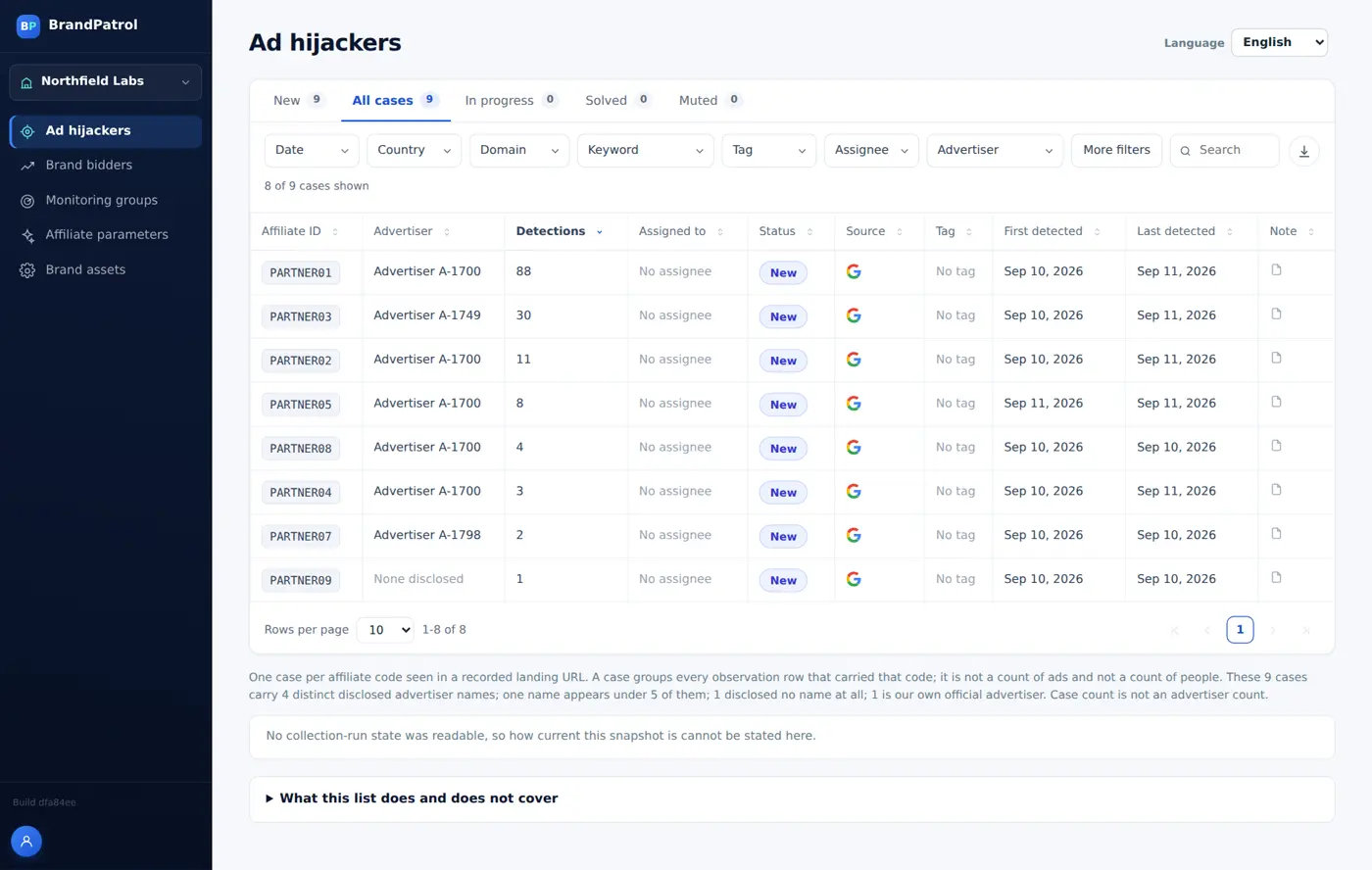
Each case ships with timestamped SERP and landing-page screenshots, the full hop-by-hop chain, the identity behind it, and the country and device observed, plus a status your team can track.
Start with a one-time Snapshot Audit, or run the same checks on a schedule with Continuous Monitoring so a new hijacker or brand bidder shows up as a new case on your next scan.
Each client brand gets its own workspace, so its cases, roster, and evidence never mix with another client's. One login covers the whole portfolio.
Every item below is public information. What a shopper searching your brand would already see, plus the disclosure record every advertiser already has to publish. No login to your ad accounts, affiliate platform, or CRM, and no end-customer data is touched.
Every scan is scoped to your brand before it runs, across whichever of these dimensions actually matter to your program.
Coverage is set during onboarding and isn't locked in afterward. Add a country, a device, or a language variant, or scale back down as your program changes. We scope to what you actually need rather than selling a fixed bundle of capacity, and these choices carry straight into your Snapshot Audit or Continuous Monitoring quote.
The same ad, seen by two different monitoring cadences across one week.
A Snapshot Audit is one pass across the countries and devices you choose, run on day one. It shows what was running at that moment.
A scan can only capture an ad that is being served while it runs. An ad that starts running later in the week is simply not there on day one, so the snapshot does not see it.
Continuous Monitoring runs the same checks on a schedule you set per brand, so there is another pass coming after the one that missed it.
When the ad appears, the next scheduled scan picks it up and it arrives as a new case on your next scan instead of sitting undetected.
Each one works together on every case. Roster-aware from the first check, evidenced well enough to hand to a network as-is.
BrandPatrol captures the paid search and shopping ads that actually render for your branded search terms, then inspects the display URL and follows every redirect hop through to the final landing page. The advertiser behind that chain is checked against your authorized-partner roster; no match anywhere on it is what makes it a hijacker. That's often someone selling a competing or counterfeit product, or simply skimming traffic that should have reached you for free.
When an ad on your branded term turns out to come from inside your own affiliate program. BrandPatrol follows the redirect chain hop by hop and pulls the tracking parameter out of the final URL. The same parameter your network uses to pay commission. That parameter identifies the network and the specific partner ID behind the ad. If that partner isn't authorized to bid on branded terms, it's filed as a case with the ID and network already attached.
Before anything becomes a case, BrandPatrol matches the affiliate ID or advertiser identity it just extracted against the roster you maintain for that brand. The same roster you edit directly in the workspace as partners join or leave your program. A fully authorized match is logged and left alone; only detections with no match, or a match that's outside its agreed terms, get raised. Update the roster once and it applies to the next scan, scheduled or on-demand, with nothing to re-run by hand.
A case is never just an alert. Each one ships with a timestamped screenshot of the SERP itself, a second timestamped screenshot of the landing page the redirect chain actually ends on, the full hop-by-hop chain, the affiliate or advertiser identity behind it, and the country and device it was observed on. Every case also carries a status: new, in progress, solved, or muted so your team can track it through to resolution instead of re-discovering it on the next scan.
Start with a Snapshot Audit: a single one-time pass across the countries and devices you choose when you just need a first look at what's running on your brand today. Move to Continuous Monitoring and the same checks run on a schedule instead, so a new hijacker or brand-bidder shows up as a new case on your next scan rather than sitting undetected for months. Cadence, countries, and devices are all set per brand and can change as your program does.
Onboard a new client brand yourself in three steps: name the brand and point it at the client's domain, let the homepage scan propose hero-product candidates. It reads JSON-LD product data, the og:title tag, the page title, and the H1 as heuristics. Then start from roughly 30 AI-suggested high-intent keywords and edit that list before it goes live. Each brand gets its own workspace, so its cases, roster, and evidence never mix with another client's. Access is granted per account per brand, so you can bring a client's own team into just their workspace without handing them the rest of your client portfolio.
The three-step overview covers scope, scan, and trace at a high level. Here's what actually happens between an ad rendering and a case landing in your workspace.
Not shipped yet, flagged here so you know what's coming, not sold as something you can use today.
Flagging fake storefronts and social accounts impersonating your brand (phishing domains, typosquatted lookalikes, and social handles copying your name and logo. This moves past paid search into a different kind of exposure: customer trust and account security, not just ad spend lost to a competing bidder. Not part of any scan today; it will surface as its own detection type once it ships, not folded quietly into existing cases.
Turning a confirmed case directly into a submitted complaint with the ad network, registrar, or platform, instead of your team copying evidence into their form by hand. Complaint status would track in the same workspace as the case itself, next to its screenshots and redirect chain. Today, filing the complaint is still a manual step your team takes using the evidence a case already provides.
Catching unauthorized use of your trademark inside an advertiser's own ad headline, description, or display URL (not just in the keyword being bid on, which today's hijacking and brand-bidding checks already cover. An advertiser can bid on a generic term and still put your brand name directly in the ad copy itself; that's a separate signal and needs its own check. Not evaluated by any scan yet.
No monitoring product is complete, and we'd rather say so here than have you discover it on your own.
What a scan captures, where it can look from, and what it leaves to you. Prefer the full picture? Read how it works or the complete FAQ.
Each case includes a timestamped screenshot of the search results page, a second timestamped screenshot of the landing page the redirect chain ends on, the full hop-by-hop redirect chain, the affiliate ID and network or advertiser identity, and the country and device where the ad was observed. Cases also carry a status: new, in progress, solved or muted.
Coverage is scoped per brand. You can choose country-level and, where needed, city-level targeting, desktop and mobile devices, and multi-language search results. It is set during onboarding and can change later, so you can add a country, a device or a language variant as your program changes.
No. Every detection is matched against the authorized-partner roster you maintain for the brand before it can become a case. A fully authorized match is logged and left alone. Only detections with no match, or a match outside its agreed terms, are raised, and roster changes apply to the next scan.
Yes. A scan covers the paid search results returned for your branded terms and shopping and product-listing ad placements, wherever the search engine surfaces them. For each ad it records the display URL and follows every redirect hop through to the final landing page.
Both. A Snapshot Audit is a single one-time pass across the countries and devices you choose. Continuous Monitoring runs the same checks on a schedule, so a new hijacker or brand bidder shows up as a new case on your next scan. Cadence, countries and devices are configured per brand.
Not today. A case gives you the evidence, and filing a complaint with the ad network or platform is still a step your team takes. Automated takedown filing is on our roadmap and marked as coming soon; it is not part of any plan you can buy now.
Tell us your branded keywords and the regions that matter. We'll scope what a first pass would surface.
Get a quote